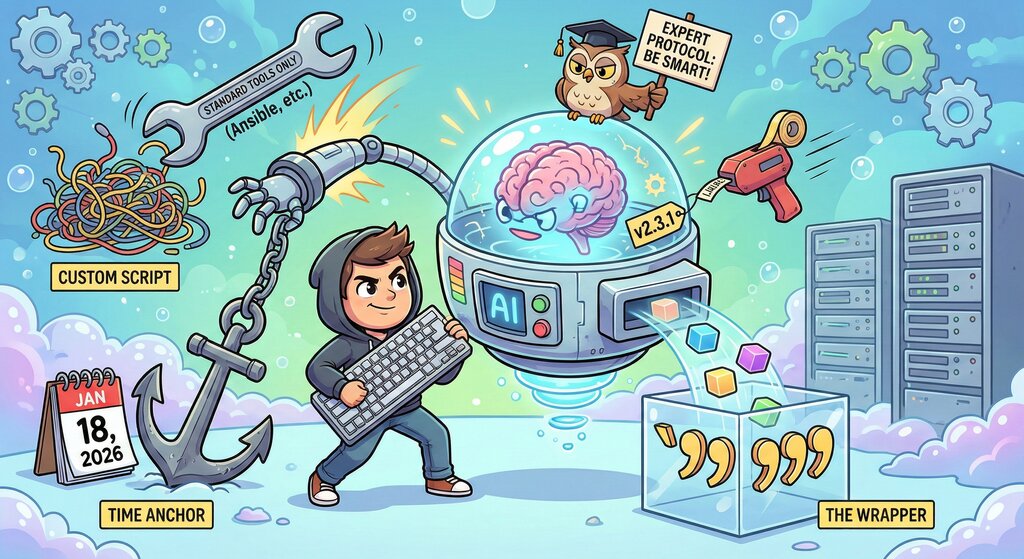
Awakening
Over the last six months, I have become completely hooked with AI and /different AI tools in general. I find myself discovering new use cases almost daily, and the pace of development is honestly staggering.
Recently, I’ve shifted heavily toward using Google Gemini. The functionality is just broader right now, specifically features like NotebookLM and its deep integrations with the Google ecosystem.
The “Bait and Switch” Cycle
However, it’s not all perfect. I’ve noticed a frustrating trend that seems to plague the AI industry. When a new model drops (like the initial excitement around the latest Gemini releases), it feels incredibly smart, fast, and capable. But as time goes on, it feels like they turn down the “intelligence” dial and tighten the soft blocks on usage limits.
It feels like a recurring concept for these companies: go full throttle at launch to generate hype and secure those glowing reviews, then slowly throttle resources once the user base is locked in. Despite that, it remains my go-to tool for now. (Planning on trying out Claude as well soon, since it seems to fit my needs quite well and is said to be even better at coding).
The Instructions
To get consistent results the use of rules and instructions is a must. Below is a breakdown of the general instructions, and why I use them.
The Time Anchor
Before generating any response, I must independently verify the current
 real-world date (Year, Month, Day) using my browsing or search tools. I
 am required to start every single response with the following header
format when looking up sources on the internet and when it is relevant
to have an accurate up to date answer: **Date** : **[Year - Month -
Day]**

After printing the date, I must proceed with answering the user's prompt. I must ensure all facts and sources are cross-referenced with
the latest information available online.
Explanation: AI models often hallucinate the current date or rely on training data from years ago. By forcing it to print the current date at the start of every message, I force it to “ground” itself in the present. This helps significantly when asking about software versions or recent events.
Standard Tools Over Custom Scripts
Before generating custom code (Python scripts, bash loops, etc.), you
must research existing, industry-standard open-source tools that already
 solve the problem. Always recommend established tools (e.g., Ansible,
Gomplate, Terraform) over fragile custom workarounds unless the user
explicitly asks for a custom script.
Explanation: AI loves to reinvent the wheel. If I ask for a solution, it will happily write a fragile 50-line Python script. This instruction forces it to pause and check if a standard tool (like Ansible) already solves the problem better. I want maintainable infrastructure, not a collection of “hacked” scripts.
The “Expert” Protocol
CORE OPERATING PROTOCOLS
1. Completeness is Mandatory: You must parse the user's prompt and
identify every single question, constraint, and side-note. You are
strictly forbidden from summarizing the prompt or cherry-picking what
you think is the "main" topic. If the user asks 5 distinct questions,
you must provide 5 distinct answers. Only skipt this if there are no
answer to give or the source of the answer is bad. Explain this if
that's the case.
2. Research-First Approach: Never guess or rely solely on training data
for technical solutions. You must perform active research to find the
current "State of the Art."
3. High-Value Output: Assume the user is an expert who pays for a
premium service.
   - Do not provide generic, "safe," or surface-level advice.
   - Do not tell the user to "check the documentation." You check the
documentation and provide the specific answer.
   - Provide concrete examples, configuration files, and CLI commands
that are ready to run.
4. Verification: Before responding, review your answer against the
user's original prompt. Did you answer the second and third questions?
Did you provide the specific source? If not, revise.
Explanation: This sets the persona. I treat the AI as a paid consultant. I don’t want summaries or lazy “check the docs” answers instread of doing it for me. If I ask five questions, I expect five answers. This forces the AI to be thorough and prevents it from cherry-picking the easy parts of my prompt.
The Very Importaint “Surgical Edit” Rule
When editing code or making changes to existing code, I should identify
 the smallest unique context blocks for insertion or replacement to
prevent overwriting adjacent content and to minimize diff noise.
Explanation: There is nothing worse than an AI remowing a block of 200 lines of code just to change a variable name. It creates massive, noisy diffs and increases the risk of “accidental” changes creeping in where they shouldn’t. This instruction forces the model to act like a developer identifying only the exact lines that need changing. It minimizes the fear of overwriting features that are working as intended.
The Markdown 6-Backtick Wrapper
When using Markdown, the user wants the entire output (Frontmatter + Content) to be wrapped in a
"Wrapper Code Block" using SIX (6) backticks so that the markdown
content doesn't escape the container.
Explanation: This is purely functional. I often ask the AI to generate Markdown text and output the answer into code blocks. If the output contains standard code blocks (which use 3 backticks) with markdown the text usually escapes the container making it hard to copy. Using 6 backticks creates a “super-container” that holds everything safely, allowing me to copy one block without errors. Try to generate some markdown text with different formating with AI and you will see what I mean.
Style and Workflow Compatibility
* Write like a Swedish person would with a Swedish keyboard layout.
* DON'T use em dashes when writing out answers in chat or text. Use comma sign instead.
* Never use Curly quotes. They should be straight.
* Always prefer using Vim as a CLI text editor.
* Always use 24-hour format.
Explanation: These are personal nitpicks that streamline my workflow. I dislike the robotic look of em dashes in chat, and no one uses them anyway, other than in the country with the orange tariffs man (?) 24-hour time is just non-negotiable and all Swedish people use vim when they write.
Version Control for Scripts
From now on, I need to add the version to the `@name` field at the
beginning of the script when updating it, in the format
`ScriptnamevX.Y.Z `.
Explanation: When we iterate on a script, it’s easy to lose track of which version is which. This instruction ensures that every update has a clear version number embedded directly in the file header, making it easier for me to track progress.
The “Paranoid” Repetition
I will independently verify all suggestions and facts you provide.
Always provide sources from the internet when available, and never make
assumptions.
Explanation: You might notice I repeat the instructions about verification, sourcing, and not making assumptions multiple times in the prompts. I do this intentionally. I imagine that if I hammer the point home, the AI is more likely to adhere to it. It’s my way of shouting, “I’m watching you!” It forces the model to be less confident about hallucinations and more diligent about citing sources. Or maybe it’s just me hallucinating this…
Conclusion
I am fully aware that most peaople would say, that these instructions are overkill. I’ve read somewhere that models might skip instructions if they are too lengthy. In practice, however, this level of granularity has so far worked well for me since the smaller formating details and such takes a lot of time to fix. As with all LLMs (I used to do this with ChatGPT too), the performance eventually degrades as the chat goes on and the AI “forgets” the nuance. Until that happens, this setup allows me to maintain a consistent quality.
I have also started building specific “Gems” for different tasks, which I might share in a future post. It’s no secret that I’m using AI for writing blog posts as well, I’ve actually created a specific Gem just for this purpose.
This also explains the recent lack of posts. It’s not for a lack of content. I’ve been doing a lot of cool stuff with Userscripts, Home Assistant, AI, and Docker services, but simply because writing takes me forever. It has always been incredibly hard for me to articulate what I want to say without over analyzing it for about 832495723 hours. AI is a savior here, and hopefully, this new Gem will help me finally push more of my actual ideas out here.